If you have encountered the error "Unable to calculate NFIQ score" your Activation service is not currently running properly which can be caused by certain Windows updates.
Please follow these directions to reenable the service:
- Save the record you are working on
- Close the LiveScan application
- Open the application Activation Wizard
- Note, you might have need someone with Windows UAC credentials if this computer is on your domain.
- There is a Service that should be running that certain Windows updates either stops or places it in a non-working state
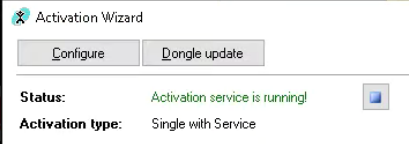 If the Status says "Activation Service is running" click on the blue button to stop the service
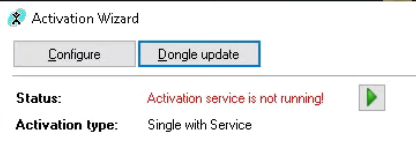 Click on the Green Triangle to restart the service.
- If the Service was already stopped then just follow Step 6 to restart the service
- Restart the LiveScan application
- Go to the Partial Tab and Click on Edit to open the record you were working on and attempt to take the fingerprints now.
The above procedure should of corrected the issue. Please let us know how it went and if you need further assistance.
Was this article helpful?
That’s Great!
Thank you for your feedback
Sorry! We couldn't be helpful
Thank you for your feedback
Feedback sent
We appreciate your effort and will try to fix the article